

Many schools want to become more digital. They want to teach better, manage smarter, and help students succeed in a digital world. But where should they begin?
The answer is: start with digitization. This article will help you understand:
-
What does digitization mean in education?
-
Why it’s the most important first step.
-
How to get started easily and effectively.
What Is Digitization?
Digitization means converting paper-based or printed materials into digital files.
This can include:
-
Scanning worksheets and saving them as PDF files.
-
Typing student records into Excel or Google Sheets.
-
Saving lesson plans in Word documents.
-
Uploading school event photos to a cloud folder.
Digitization helps schools store, organize, find, and share information more easily. It does not change how schools operate—but it prepares them for future digital improvements.
Why Digitization Is the First Step in Digital Transformation
Digital transformation in education has many stages, but it always starts with digitization. Without it, your school cannot move forward with online learning, digital management, or cloud-based tools.
Here’s why digitization is essential:
-
It creates a digital archive
You need digital files to use modern tools like learning apps, student platforms, and reporting systems. -
It supports better infrastructure
Cloud platforms like Google Drive or Microsoft OneDrive work best when files are already in digital form. -
It builds digital habits
Staff and teachers get used to using digital tools—such as scanners, naming files, and organizing folders. -
It improves data protection
Digital files can be backed up and protected more easily than paper files.
How Digitization Prepares Schools for the Next Steps
Digitization lays the foundation for deeper changes in how a school works. Here’s how it supports future phases of digital transformation:
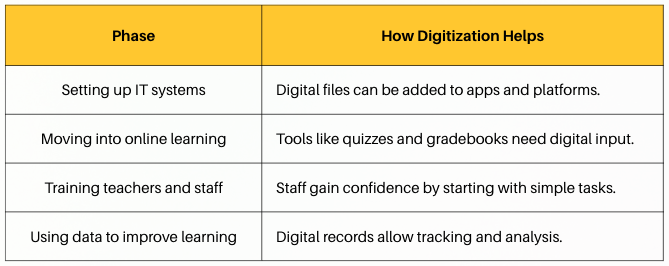
Without digital files, these steps are harder or even impossible.
How to Start Digitizing Your School
You don’t need to spend a lot of money or time to begin. Follow these simple steps:
-
Choose important files first
Start with student records, lesson plans, report cards, and schedules. -
Organize your folders
Use clear folder names like “Grade 6 Math” or “2025 Reports”. Name your files consistently, such as “Attendance_April2025.pdf”. -
Use basic tools
A flatbed scanner and a cloud folder (like Google Drive) are enough to begin. -
Train your team
Help staff learn how to scan, save, and organize files. Provide clear instructions and shared folders. -
Backup your files
Make regular copies and decide who can access which folders.
Digitization is a small step with a big impact. It is the first, most practical action every school should take to become more modern and digital.
Once your documents are digital, it becomes easier to:
-
Set up learning platforms.
-
Track student progress.
-
Share lessons and feedback.
-
Protect your school’s information.
If your school hasn’t started digitizing, now is the time. Start small, stay consistent, and soon you’ll be ready for the next stage of digital education.